


Carefully selected materials that deliver exceptional print quality, durability, and shelf presence.


 New










Understanding the Purpose of Colored Dots on Packaging
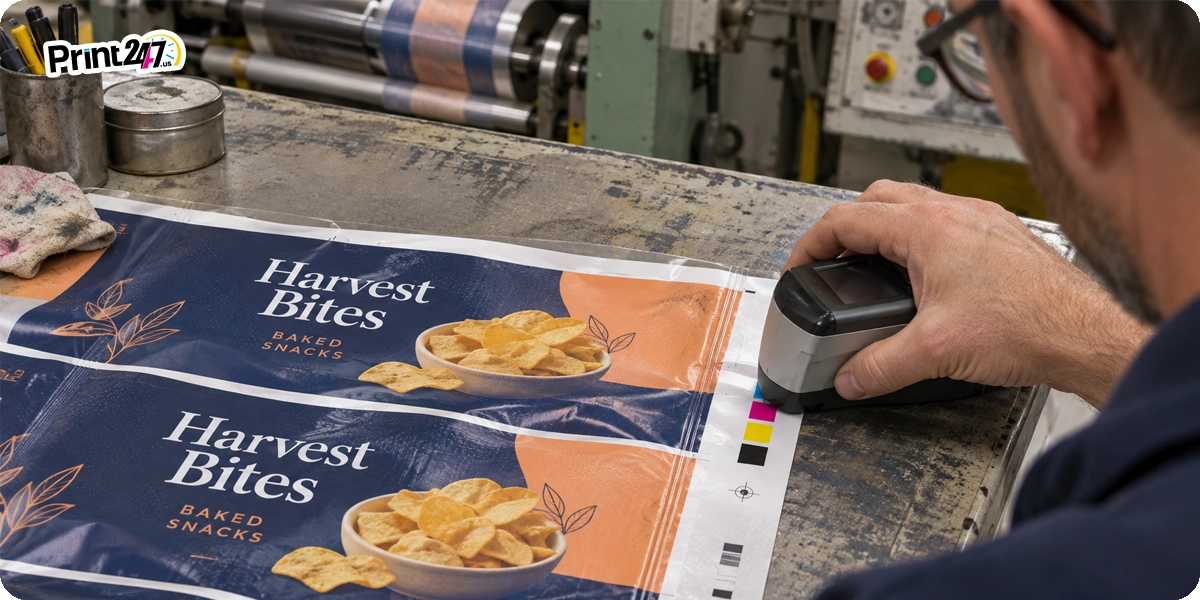
The colored dots on packaging are actually control patches. They are sometimes called printer’s color blocks. These small marks have nothing to do with the product and don’t give any information about flavor or the expiration date. Printers measure them to keep color and alignment on target.
Look at the back seam of most chip bags and you’ll find a row of small colored circles. Colors usually include red, blue, yellow, and black, with a little gold or white tagging along. So what are the colored dots on packaging, really?
You'll read creative answers in the online world. Search "what are those colored dots on packaging" and you'll see what we mean. Some sites claim they’re flavor codes; others call them diet labels.
The real answer to this query is less dramatic than many other claims. The following sections explain what each dot does, which myths to ignore, and why any brand printing its own boxes or bags should care.
They're color control patches and a quick quality check for the printer.
One dot per ink: cyan, magenta, yellow, black, plus any brand color.
They don't mean anything about the food or product inside.
Brands can hide them on seams, flaps or trim.
What Are the Colored Dots on Packaging?
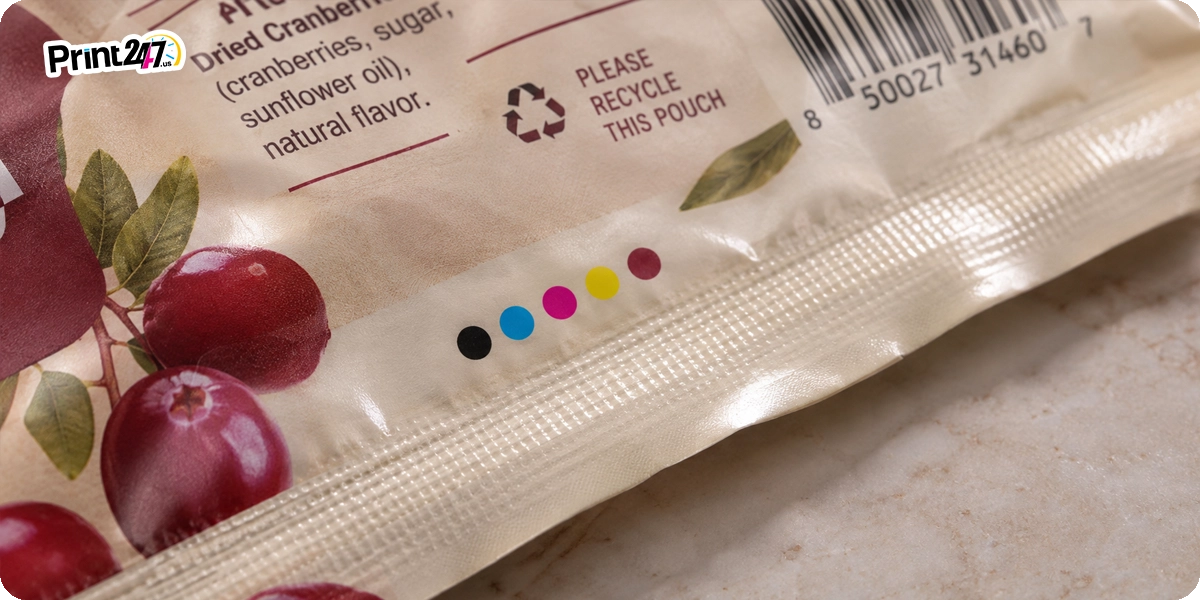 Color control patches or dots are small blocks of solid ink that printers put on custom packaging so they can check the print. They appear like little test strips on every bag or box.
Every ink on the press gets its own dot. If there are four inks used, you will see four dots. Six inks, six dots. It really is that simple. A printer can tell from those dots whether the color is correct, whether the ink density is correct (meaning how thick the ink is), and whether all the ink layers are stacked up as they should.
The odd placement is on purpose. Printers place the patches into a non-display area. It means the dots will be on the parts of a package a customer would never look at on a store shelf. These areas can be bottom flaps, gussets, and trim edges. Printers remove many of them before shipping the package. The ones that stay usually go unnoticed. It won't take long for you to spot them everywhere once you start looking.
What Are Other Names Printers Use for These Dots?
The names of these color dots are different depending on which printing shop you ask for the same thing:
Process control patches
Printer's color blocks
Color bar (when the patches run in one long strip)
Color control patches
It's like the same tool with different labels. We'll stick with "color control patches" from here on so things don't get confusing.
How CMYK Printing Creates the Colors on Your Package
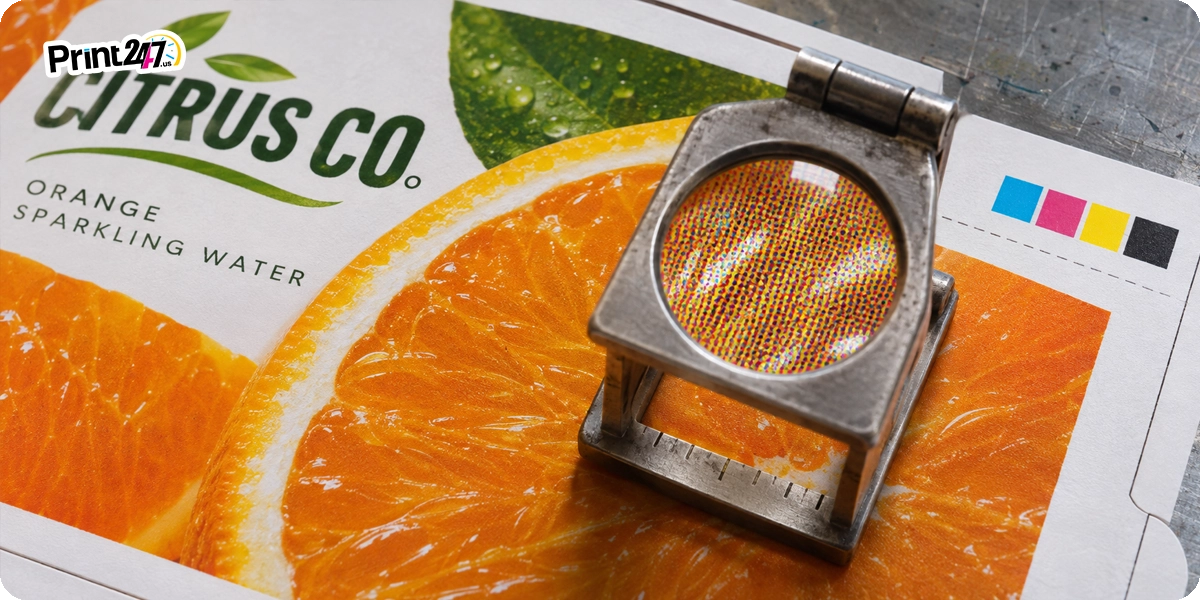 CMYK is the combination of four inks behind almost every fully printed box we've ever seen. If you have ever mixed blue and yellow paint as a child, you know what I mean. The printing press does the same thing, but with tiny dots instead of paintbrushes.
In CMYK printing, the four inks are:
Cyan, a bright sky blue
Magenta, somewhere between pink and red
Yellow, the plain sunny kind
Key (black), which handles shadows, depth and crisp text
Each ink gets its own printing plate. The press lays them down one after another. There are millions of tiny halftone dots produced as a result. Try holding the package close to your face and squinting. It is difficult to differentiate them on the bag because they blend into every color at normal distance.
Each ink has its own patch. The operator does not have to guess if the magenta patch looks weak. It's the magenta unit that needs attention.
Why There Are More Than Four Dots On Some Packages
A spot color is an ink that's mixed ahead of time. Think of a paint store mixing a gallon to a formula, rather than building the color from CMYK dots on press. Brands lean on spot colors when a shade can't be even a little off.
Take a look at the red of a soda brand, or the blue of a Pantone (PMS) color in the brand book of a company. Metallics, solid whites and neons are spot colors too. They each get their own station on the press, along with their own patch. You may see six or eight dots on a bag sometimes.
What the Colored Dots on Packaging Tell the Press Operator
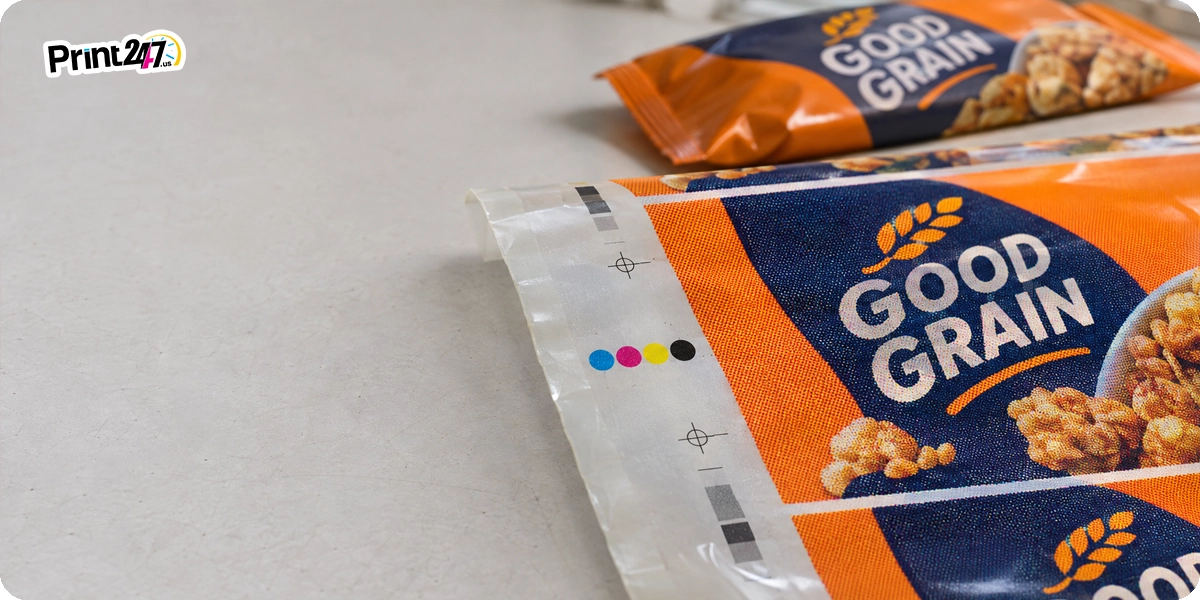 The colored dots on packaging work as an analog dashboard for a press operator. One glance or a quick reading tells the operator how each ink is behaving. Operators measure the patches with a handheld device, or an inline camera reads them automatically.
Patch Type | What It Checks | What Goes Wrong If It's Off |
Solid patch | Ink density, or how heavy each ink went down | Colors look washed out, or too dark and heavy |
Tint patch | Dot gain, when halftone dots spread and print bigger than planned | Photos and shading come out dark or muddy |
Overprint patch | Trapping, or how well one ink sits on top of another | Thin white gaps or weird colors where two inks meet |
Gray balance patch | Gray balance, the cyan, magenta and yellow mix that should read as plain gray | Grays and light areas pick up a pink, green or blue tint |
Registration target | Whether the ink layers lined up | Fuzzy text and colored halos around the edges |
Three tools do most of the measuring:
A densitometer tells the operator how much ink is sitting on the surface.
A spectrophotometer reads color the way your eye does. It gives a number instead of an opinion.
Delta E is that number's report card, showing how far the printed color drifted from target. Smaller is better.
Color Control Patches vs Registration Marks vs Eye Marks
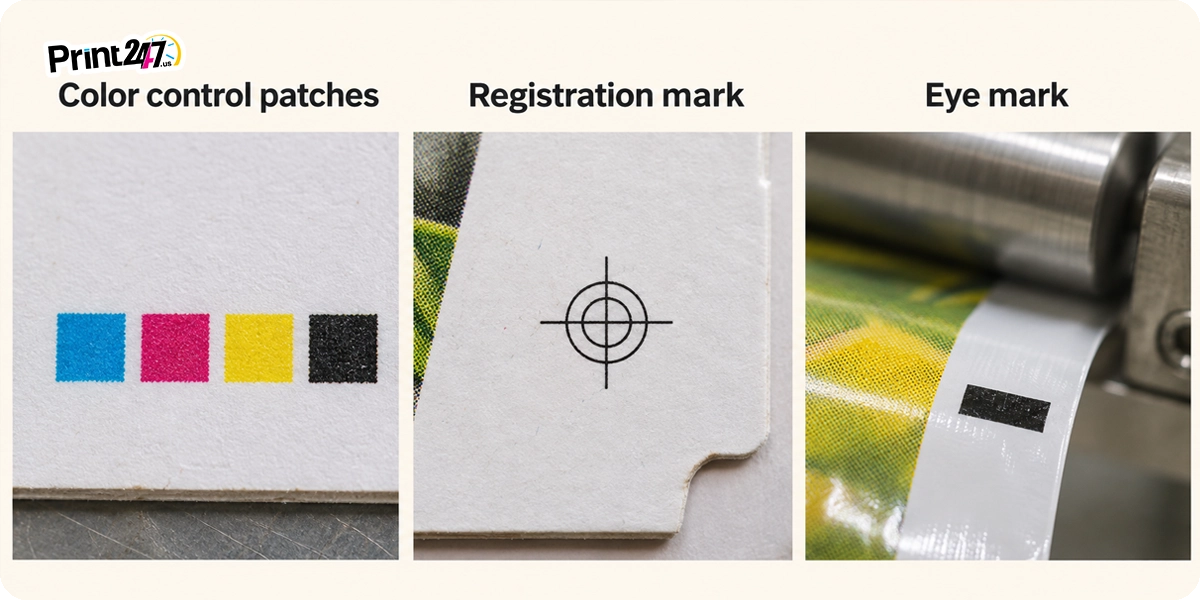 A package can carry a handful of printer's marks. They are easy to mix up. Here's a cheat sheet:
Mark | What It Looks Like | Its Job | Who Reads It |
Color control patches | A row of small solid squares or circles | Check ink color and density | Press operator, handheld tools or press cameras |
Registration marks | Crosshair or bullseye targets | Check that the ink layers line up | Press operator or press cameras |
Eye mark | One solid rectangle, usually dark | Tells the packing machine where to cut or seal | An optical sensor on the packing line |
Crop marks (trim marks) | Thin lines near the corners | Show where to cut the printed sheet | The cutting machine or finishing crew |
You'll see the colored dots called "registration marks" all over the web, even on big sites. It's an easy slip to make, since the two often sit side by side. But they don't do the same job. Registration marks tell you whether the layers are lined up. Color control patches tell you whether the color itself came out right.
What Do the Colored Circles on Food Packages Mean?
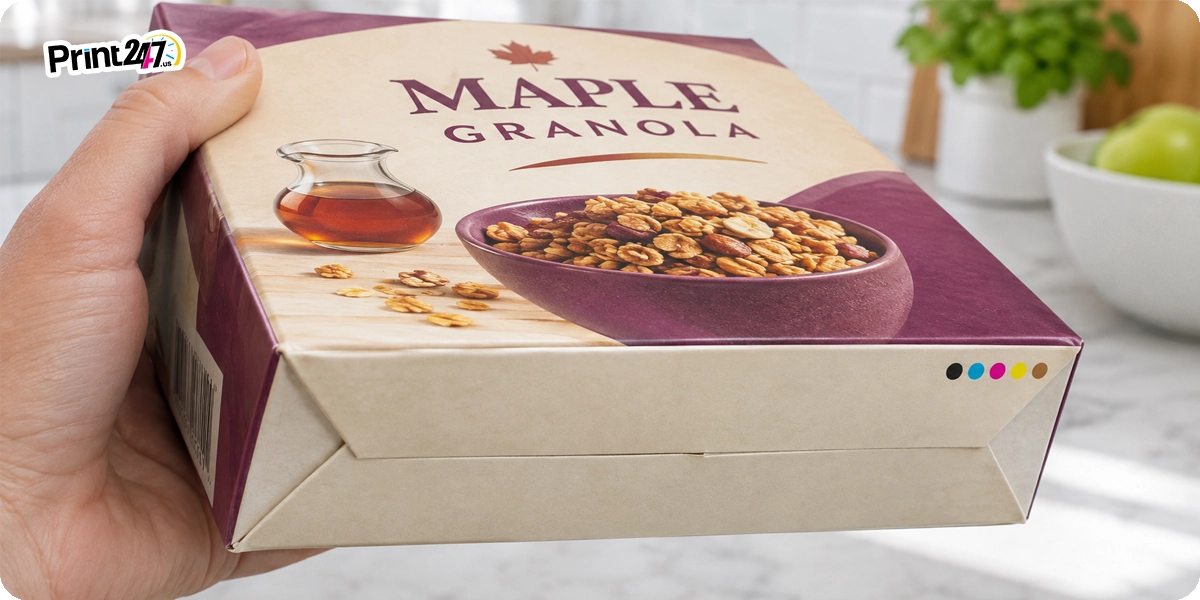 The colored circles on food packages are there for the printer. Still, if you search "what are the colored circles on food packages," websites claim they reveal flavors, diets, and even health warnings.
So let's clear up what those colored circles on food packages actually tell you, and where the real information lives:
Myth | Fact | Where to Find the Real Info |
The dots show the flavor | They match ink colors, not flavors. | The front panel and product name |
The dots show diet info (vegan, keto, diabetic-safe) | They carry no dietary meaning at all. | The Nutrition Facts panel and certified labels |
The dots warn about allergens | Allergens are never coded into dots. | The ingredient list and "Contains" line |
The dots mark the expiration date | They have nothing to do with freshness. | The best-by date, often on the top or bottom |
Black dots mean harmful chemicals | Black is just the K ink in CMYK. | The ingredient list |
The dots show recycled content | Recycling info uses its own symbols. | Recycling codes and logos |
Why Some Packages Have No Colored Dots
Plenty of packages don't show any color control patches at all. There is no point of worry in the matter. Usually it comes down to one of these:
The patches were printed on the trim and then cut off.
Digital presses are calibrated in software, so they often don’t need printed patches.
On the press, color was checked with cameras.
The label or package was simply too small to fit them.
Either way, what's inside the package is no different.
How Print247 Holds Brand Color on Every Run
A press check is when printers hold live sheets up against the approved proof to make sure they match. The following is roughly how color control patches guide a job on our floor, from the first sheet to the last:
It starts with your approved proof. Every job gets matched to the color proof you signed off on. We offer digital proofs with standard physical sample kits.
We read the patches before the run. Operators check each patch with different tools like a densitometer, a spectrophotometer or inline camera until every color hits the target.
We keep checking as it runs. Readings are taken at set intervals through the run.
Drift gets fixed on the spot. If a reading drifts past our tolerance, the operator adjusts that ink before more packages come off the press.
Contact our support team for more information about which color or printing technique would be suitable for your boxes or Mylar bags. We have dedicated experts on hand for prompt assistance.
FAQs
What do the colored dots on packaging mean?
They're color control patches. Printers use them to check ink color and alignment while the package is being printed. Each dot matches one ink. None of them say anything about the flavor or ingredients of the product.
Why do chip bags have colored dots on the back?
The back seam is a spot nobody looks at, so printers put the color control patches there. They can check every ink during the run without the dots showing up in the bag's main design.
Do colored dots on food packaging show the expiration date?
No. The dots are only there for the printer. The expiration date is printed on its own. It is usually on the top, bottom or back of the package.
What is a green dot on packaging?
The Green Dot is a European symbol made of two arrows forming a circle. It means the maker paid into a packaging recovery program. It doesn't mean the package is recyclable, and it isn't a color patch.
Do all food packages have colored dots?
No. Sometimes the dots get trimmed off, sometimes the package is printed digitally, and sometimes there just isn't room. A package without dots is no different on the inside.
Can brands keep the colored dots off the visible panels of custom packaging?
Yes. Printers can put color control patches on gussets or trim that gets cut away. Request that your printer mark the patch spots on your dieline before you approve the proof.
Get a Quick Quote

More Articles
 Bill ‘Hogg’ Ryan
When a 3 Side Seal Pouch Beats a Stand Up Pouch on Cost and Display
 Bill ‘Hogg’ Ryan
How to Select the Best Packaging Features to Extend the Freshness of Pet Treats
 Bill ‘Hogg’ Ryan